
One Go binary between your engineers and production: how we broker SSH, kubectl, psql and RDP — and what it costs
An honest walk through a broker-model access architecture: what happens on the wire, the ~20% throughput cost measured, and where certificates are the better answer.
The contractor’s public key is still in authorized_keys on eleven machines. You know because
you put it there in March, for two weeks, until the migration was done. The contract ended in
May. You remember the Ansible play that spread the keys. There was never a play that collected
them back.
This is not carelessness. It is what happens when access is handed out instead of granted. A key, a kubeconfig, a database password — each one is a copy, and once a copy exists there is no technical way to find out how many there are or where they sit. Revoking access turns into archaeology.
We spent eighteen months building something that works differently. This post is an honest walk through the architecture: what it does, what it costs in speed, and the three places where our approach is simply worse than the alternative.
Two ways to stop handing out keys
There are really only two.
Short-lived certificates. You run an internal CA, configure sshd to trust it, and issue
the user a certificate valid for eight hours. This is how Teleport works. The secret still
lands on the laptop, but it expires by itself. It is a good model, and for some threat models
it is better than ours.
The cost is the shape of the rollout. You rewrite sshd_config on every host. You put an
agent inside the cluster. So before you get access control, you need permission to change
production configuration — which is its own project, its own change window, and its own
conversation with the people who own that production.
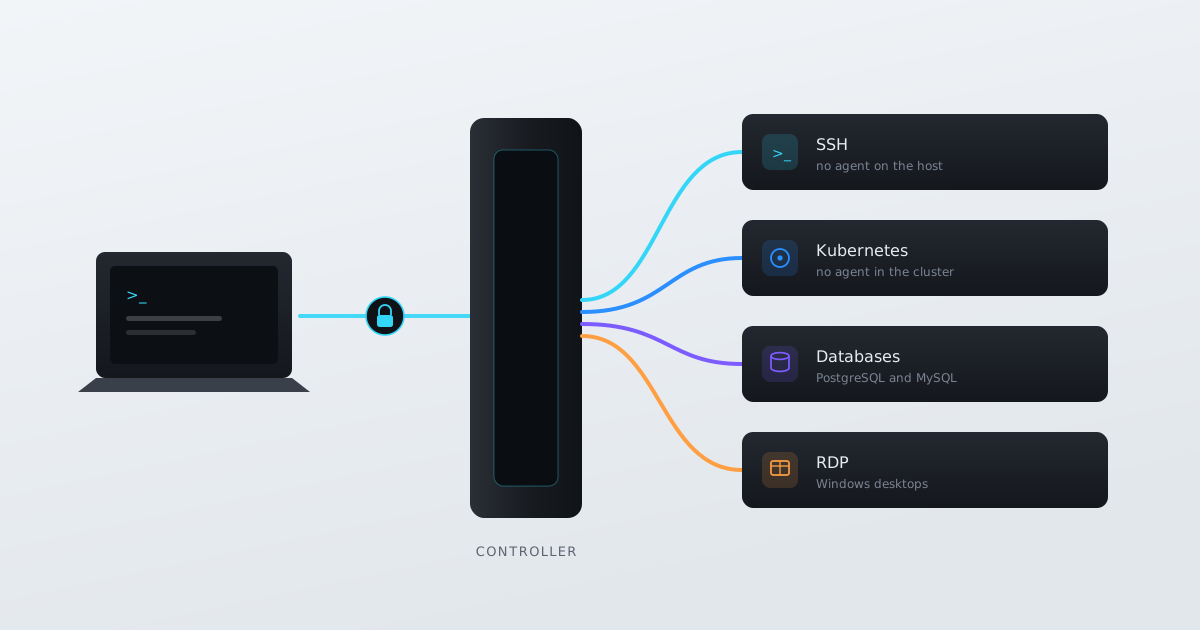
A broker. The secret never leaves the controller. The user connects to the controller, the
controller opens its own connection to the target and injects the real credential on the wire.
Nothing on the target changes: same sshd, same authorized_keys with one service key, same
kube-apiserver with no vendor pods in it.
We chose the broker. Here is how it works and what it costs.
What happens on the wire
The controller is one Go binary plus PostgreSQL 16+. There is nothing else in the control plane.
Take SSH. The client opens TLS to the controller and asks for a session to app-prod-01. The
controller:
- Checks the user’s grant for that target, and any just-in-time approval.
- Pulls the target’s credential from the database — encrypted with AES-256-GCM — and decrypts it in memory only, for the life of the connection.
- Opens its own SSH connection to the target and authenticates with that credential.
- Stitches the two connections together and starts copying bytes.
Two consequences follow.
First, all session traffic goes through the controller twice: client → controller → target and back. Moving N bytes costs 2N on the controller’s interface. That is not an optimisation we skipped. It is what a broker is.
Second, the controller holds a decrypted secret in memory. That is the main fair criticism of this model, and I come back to it at the end.
Kubernetes and databases work the same way. Only the credential changes:
| Target | Client uses | Controller injects |
|---|---|---|
| SSH | ssh, scp/sftp, built-in terminal | username + password or private key |
| Kubernetes | kubectl, any kubeconfig tool | cluster bearer token or client certificate |
| Database | psql / mysql, GUI clients | database username + password |
| RDP | native remote desktop window | Windows username + password — sent to the local client |
RDP needs saying plainly, because it is the exception. NLA requires the credential before the session exists. There is nothing to proxy: the password has to reach the client. We pass it to the bundled RDP client over an in-memory channel on a loopback port. It is never shown in the UI, never written to disk, never stored in the Windows Credential Manager, and every issue is audited. But claiming the secret stays on the controller for RDP would be a lie. It does not.
Read-only on three protocols
This is where we decided not to pretend.
The idea is simple. A grant has a level — view, read-only, read-write. Read-only should behave the same on SSH, in the cluster and in the database. But it is implemented on three different layers, and they are not equally strong.
Kubernetes is real enforcement. kubectl talks HTTP to the kube-apiserver and we are on
that path. We parse the request, look at the verb and the resource, and reject mutating calls
before they reach the cluster. kubectl get pods passes. kubectl delete pod does not. You
cannot get around that while staying inside the protocol.
SQL is real enforcement too. We parse the PostgreSQL and MySQL wire protocols and filter at
the statement level. INSERT, UPDATE, DELETE, any DDL — rejected before the database. Not
grants inside the DB, not a read replica. The statement never arrives.
SSH is a railing, not a wall. We have a configurable command blocklist applied at the SSH
channel level, plus blocking of writes and uploads — >, >>, sftp/scp. The default list:
apt, chmod, chown, dd, mv, rm, shutdown, systemctl, useraddIt catches a typo. It catches someone who forgot they were on prod and not staging. It does not catch someone who wants to get around it, because an interactive shell is a Turing-complete environment and any command blocklist in one can be bypassed in principle. Our own documentation says it: treat it as a guardrail, not a hard boundary. If you need a hard guarantee on SSH, point the broker at a read-only OS account. That is the only honest answer.
We could have left that out of the docs. We put it in, because the first person who checks would find it anyway — and would then stop trusting everything else.
Taking write access off a live session
This is the one thing that, as far as we could verify from Teleport’s, StrongDM’s and Boundary’s own documentation on 14 August 2026, none of them do.
The situation: an engineer is on production with read-write. You are watching the session live and you see them about to do something wrong. The usual answer is to kill the session. But killing a session in the middle of an incident is also damage, and often you do not want to cause it. You want the person to keep reading logs and stop being able to change anything.
In a certificate model this is structurally hard. The permissions are baked into a certificate that has already been presented and accepted by the target. Changing them means a new connection.
With a broker it is different, because we decide about every byte, not the target. The grant level lives in the session state on the controller, not in the credential. Change it, and the next parsed SSH channel, the next HTTP request to the apiserver, the next SQL statement goes through a different filter. The connection does not drop. The user sees a command suddenly stop working, which is exactly the behaviour you want.
The flip side is obvious: this works because we are in the path. The same thing that lets us change the rules mid-flight makes us a single point of failure in the access path. That is not free.
The benchmark
Any proxy adds overhead. The only questions are how much, and whether the vendor is honest about it.
20 concurrent SSH sessions, measured over loopback:
| Native SSH | Through Tessera | |
|---|---|---|
| Total throughput | ~540 MB/s | ~440 MB/s |
| Overhead | — | ~20% |
The method matters more than the number. Loopback is deliberate: it removes the network from the equation and leaves only the cost of the proxy itself — the extra encrypt/decrypt pass and the buffer copies. On a real network the double hop adds its own latency and its own bandwidth cost on top.
So 20% is the floor, not what you should expect. Yours will be worse. How much worse depends on where the controller sits relative to the targets, which is why the docs tell you to put it in the same datacentre. The double hop costs latency as well as bandwidth, and latency is what an interactive user feels.
You can reproduce it yourself with the -compare mode of our loadtest tool. If you get a
worse result than we did, tell us — that is more interesting than matching it.
One conclusion follows directly: Tessera is not for bulk transfer. Database dumps, CI artefacts, backups — route them around the broker. It is for interactive work, and for having a record of it.
Sizing: the unit is not team size
The most common planning mistake is counting people. The controller does not know how many engineers you have, and does not care how many targets are registered. It only knows concurrent sessions.
Rule of thumb: on a normal working day, 10–20% of a team is connected. A 200-person organisation is 20–40 concurrent sessions, not 200.
The memory arithmetic is simple: ~256 KB of copy buffers per session plus 6–10 goroutines at
~8 KB, so ~320 KB per session. Base process ~30 MB. Go does not return memory to the OS
immediately, and at the default GOGC=100 resident settles at roughly twice the live heap.
| Concurrent sessions | vCPU | Expected resident | Provision |
|---|---|---|---|
| up to 50 | 1 | ~90 MB | 512 MB |
| 50–200 | 2 | ~190 MB | 1 GB |
| 200+ | 4 | ~380 MB | 2 GB |
The gap between the last two columns is headroom, not a hidden cost. A controller serving 200
sessions really does use a few hundred megabytes. The Helm chart ships requests: 256Mi and
limits: 1Gi, which matches the middle row.
CPU is almost never the limit. The double encryption — TLS with the client, SSH with the target — is cheap on any modern CPU with AES-NI. The network interface saturates first.
| Workload | Link |
|---|---|
| Interactive only (SSH · k8s · SQL) | 100 Mbit/s |
| Interactive + occasional scp/rsync | 1 Gbit/s |
| Heavy transfer, or 50+ concurrent RDP | 10 Gbit/s |
An interactive terminal is a few KB/s per session; 200 shells is single-digit Mbit/s. RDP is a different animal: 0.5–5 Mbit/s per session, sustained rather than bursty. Twenty concurrent RDP sessions, after the double hop, is 100–200 Mbit/s through the controller. If RDP is a real part of your usage, size the link from RDP alone and treat the rest as rounding error.
Two things about disk, the second one a trap. First: only terminal sessions are recorded, as
asciinema .cast files, at 1–5 MB per session-hour; htop and tail -f on a live log go
past the top of that range. Second: TESSERA_RECORDING_RETENTION_DAYS and
TESSERA_AUDIT_RETENTION_DAYS both default to 0, which means keep forever. If you do not set
them, the answer to “how big does this get” is “as big as the controller’s entire history”.
Three small things you only see from inside
We ignore forwarded-for on purpose. The login rate limit counts against the real TCP
connection address. Counting X-Forwarded-For means the limit can be bypassed by setting a
header, which means there is no limit. This costs us correct behaviour behind some proxies and
we think the trade is right.
Targets are checked for SSRF. The target host is validated on create and on update. Loopback, link-local and similar addresses — the ones that would turn the controller into an internal network scanner — are rejected. The controller has network access to everything interesting by definition, so letting any admin point it anywhere would be careless.
TOFU for host keys. On first connection the target’s host key is stored; later, a changed
key is rejected. This is StrictHostKeyChecking=accept-new raised to the organisation level.
It catches silent MITM substitution. It does not protect the first connection, same as
everywhere else without a host-key distribution system.
Where we are worse
Probably the section worth reading.
We are not open source. Community is free and self-hosted, but proprietary, and it needs an offline licence file — checked locally, with no request going out, but still a file. Our own Teleport comparison page admits this makes air-gapped installs simpler for them. If reading the source is a hard requirement for you, we are not your tool, and that is fine.
amd64 only. Debian 12 or Ubuntu 22.04+, amd64 images. Graviton, Ampere, the Pi in your cupboard — no. I am not giving a date, because nobody gave me one.
We hold long-lived credentials in one box. This is the fundamental criticism of the broker model and it is fair. Our answer is encryption at rest, decryption in memory only for the life of the connection, a write-only console, SSRF validation, TOFU, rate limiting, and a recommendation in our own docs to run an independent pentest before go-live. But a certificate model has a structurally different failure mode, and for part of the threat space it is better. That is Teleport’s argument, it is honest, and pretending otherwise would be silly.
RDP is not recorded. The tunnel carries the RDP protocol, not a terminal stream, so there is nothing to write. Only audit events. Windows-heavy shops should plan their controls around that.
Databases are PostgreSQL and MySQL only. No MSSQL, no Mongo, no Redis, no Oracle.
Trying it
Three ways to run the controller: apt package on Debian/Ubuntu, Docker Compose, or Helm. The Community edition is free forever: one seat, 5 SSH targets, 1 cluster, 1 database, 5 RDP, credential injection, TOFU, and an audit log of events and commands — without session replay or live watch, which are in the paid tiers.
Architecture and limits: https://tessera.company/docs/get-started/what-is-tessera/ Full sizing and benchmark: https://tessera.company/docs/reference/requirements/
If you find a place where the docs and the behaviour disagree, tell us. We fix docs more often than we fix code.
Also posted on dev.to